Fitxategi:Sphere (parameters r, d).svg
Nabigaziora joan
Bilaketara joan

SVG fitxategi honen PNG aurreikuspenaren tamaina: 600 × 600 pixel. Bestelako bereizmenak: 240 × 240 pixel | 480 × 480 pixel | 768 × 768 pixel | 1.024 × 1.024 pixel | 2.048 × 2.048 pixel.


Jatorrizko fitxategia (SVG fitxategia, nominaldi 600 × 600 pixel, fitxategiaren tamaina: 7 KB)
.svg)
Laburpena
| Deskribapena |
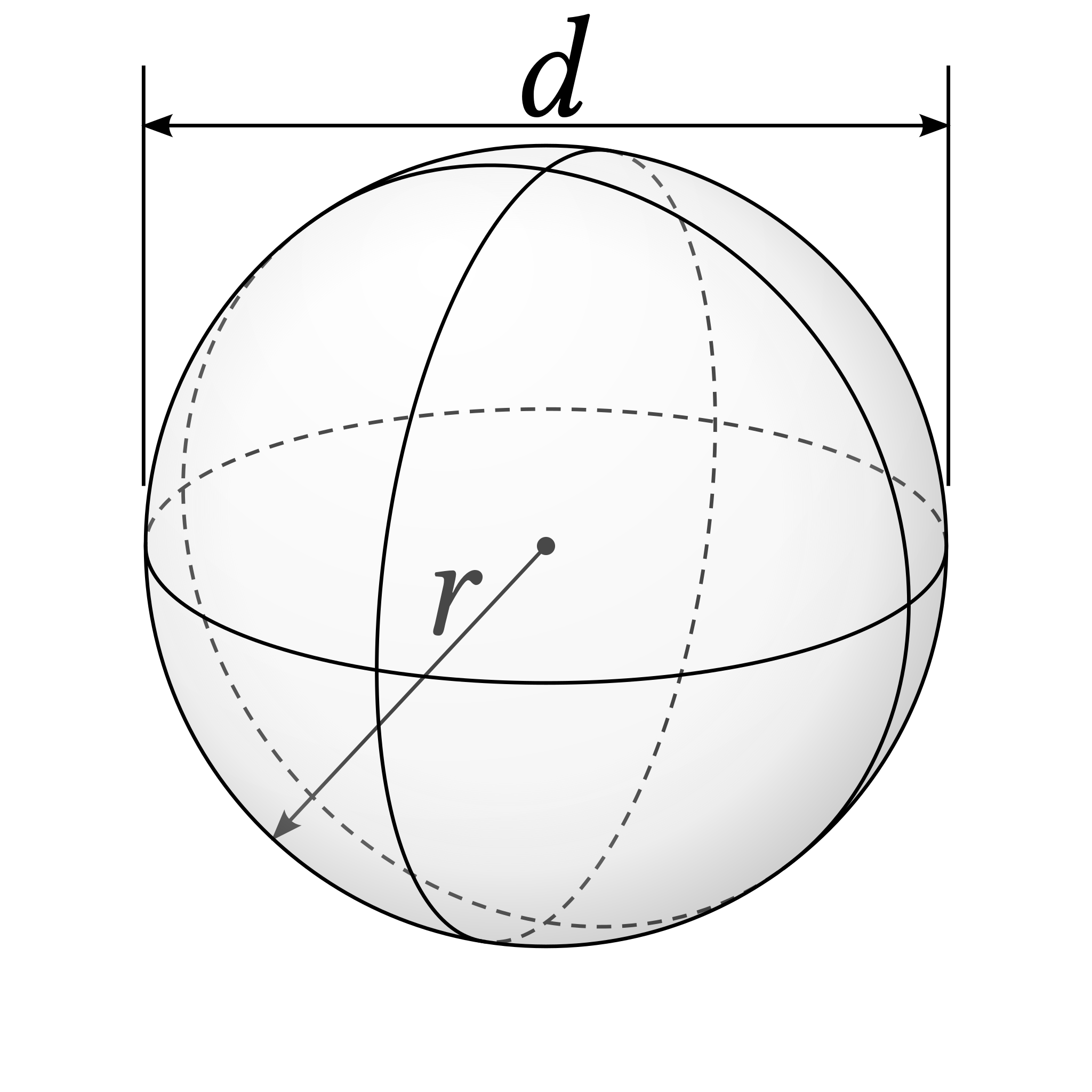
English: A figure showing radius and diameter of a sphere. |
| Data | 2019-08-26T05:42Z |
| Jatorria |
Fitxategi hau hemendik eratorria izan da: Poincare-sphere stokes.svg by Geek3 |
| Egilea | Steven Baltakatei Sandoval |

Source Code
The image is created by the following source-code. Requirements:
python3 source code:
# -*- coding: utf-8 -*-

# This python3 code uses `svgwrite` to create an `svg` (Scalable
# Vector Graphics) file illustrating a sphere with radius and diameter
# depicted. The code was adapted from code available at
# https://commons.wikimedia.org/wiki/File:Poincare-sphere_stokes.svg
# to illustrate a Poincaré sphere, a geometric model important to
# describe polarisations of electromagnetic waves.

# This code is a derivative of Poincare-sphere stokes.svg ([[:File:Poincare-sphere_stokes.svg]]) by Geek3 (https://commons.wikimedia.org/wiki/User:Geek3) used under the CC BY 3.0 license ([[:File:Poincare-sphere_stokes.svg]]). This code is licensed under CC BY-SA 4.0 (https://creativecommons.org/licenses/by-sa/4.0/) by Steven Baltakatei Sandoval.

try:
    import svgwrite as svg
except ImportError:
    print('You need to install svgwrite: https://pypi.org/project/svgwrite/')
    # documentation at https://svgwrite.readthedocs.io/en/master/
    exit(1)

from math import *

# define function to convert spherical coordinates (theta,phi,radius) into cartesian coordinates (x,y,z)
def to_xyz(theta, phi, r=1):
    return r * sin(theta) * cos(phi), r * sin(theta) * sin(phi), r * cos(theta)

# define function to convert cartesian coordinates (x,y,z) into spherical coordinates (theta,phi,radius)
def to_theta_phi_r(x, y, z):
    return atan2(z, sqrt(x**2 + y**2)), atan2(x, y), sqrt(x**2+y**2+z**2)

# define function to rotate (?) given cartesian coordinates (x,y,z) by angle (a) in radians.
def rotx(x, y, z, a):
    y, z = cos(a) * y + sin(a) * z, cos(a) * z - sin(a) * y
    return x, y, z

def ellipse_path(theta, phi, tilt, flip=False):
    t, p, r2 = to_theta_phi_r(*rotx(*(to_xyz(theta, phi, 1) + (tilt,))))
    a = abs(r)
    b = abs(r * sin(t))
    # Construct Path Command string. Commands include `M` ('moveto') and `A` ('elliptical-arc'.
    #   reference: https://svgwrite.readthedocs.io/en/master/classes/path.html
    return 'M %f,%f A %f,%f %f %i,%i %f,%f' % (-r*cos(p), -r*sin(p),
        a, b, p*180/pi, 0, {True:1, False:0}[flip], r*cos(p), r*sin(p))

# document
size = 600, 600 #600px = 450pt
doc = svg.Drawing('sphere_(param_r,d).svg', profile='full', size=size)
doc.set_desc('sphere_(param_r,d).svg', '''Drawing of a sphere with radius r and diameter d.
rights: GNU Free Documentation license,
        Creative Commons Attribution ShareAlike 4.0 license''')

# settings
dash = '8,6'
col = 'black'
r = 220
tilt = radians(-70)
phi = radians(-25)
cp, sp = cos(phi), sin(phi)

# background
doc.add(doc.rect(id='background', profile='full', insert=(0, 0), size=size, fill='white', stroke='none'))

# arrow markers
arrow_e = 'M 8.7185878,4.0337352 L -2.2072895,0.016013256 L 8.7185884,-4.0017078 C 6.9730900,-1.6296469 6.9831476,1.6157441 8.7185878,4.0337352 z'
arrow3 = doc.marker(id='arrow3', orient='auto', overflow='visible')
arrow3.add(doc.path(d=arrow_e, fill=col, stroke='none',
    transform='scale(0.8) rotate(180)'))
doc.defs.add(arrow3)
arrow4 = doc.marker(id='arrow4', orient='auto', overflow='visible')
arrow4.add(doc.path(d=arrow_e, fill=col, stroke='none',
    transform='scale(0.8)'))
doc.defs.add(arrow4)

# make a group for the sphere and define SVG Presentation Attributes (See 'https://svgwrite.readthedocs.io/en/master/attributes/presentation.html')
sphere = doc.g(transform='translate(300, 300)', fill='none', stroke=col, stroke_width='2')
#sphere['font-family'] = 'DejaVu Sans'
sphere['font-family']  = 'Linux Libertine O'
sphere['font-size']    = '80px'
sphere['font-style']   = 'italic'
doc.add(sphere)

# back ellipses
sphere.add(doc.path(d=ellipse_path(0, 0, tilt),
    stroke_dasharray=dash, stroke=col)) # horizontal back
sphere.add(doc.path(d=ellipse_path(pi/2, phi, tilt, True),
    stroke_dasharray=dash, stroke=col)) # vertical back 1
sphere.add(doc.path(d=ellipse_path(pi/2, phi+pi/2, tilt),
    stroke_dasharray=dash, stroke=col)) # vertical back 2

# draw center point
sphere.add(doc.circle(center=(0, 0), r=5, fill=col, stroke='none'))

# draw radius line
radius_angle = radians(-227)
radius_line = doc.line(start=(0, 0), end=(0.99*r*cos(radius_angle),0.99*r*sin(radius_angle)), stroke=col)
radius_line['marker-end'] = arrow3.get_funciri()
sphere.add(radius_line)

# draw radius label, r
radius_label_pos_x = str(-0.25*r)
radius_label_pos_y = str(0.22*r)
radius_label_transform_str = "translate(" + radius_label_pos_x + ", " + radius_label_pos_y + ")"
sphere.add(doc.text('r', text_anchor='middle',
   transform=radius_label_transform_str, stroke='none', fill=col))

# sphere surface
grad1 = doc.defs.add(doc.radialGradient(id='grad1',
    center=(0.375, 0.15), r=0.75, gradientUnits='objectBoundingBox'))
grad1.add_stop_color(offset=0, color='#ffffff', opacity=0.3)
grad1.add_stop_color(offset=1, color='#dddddd', opacity=0.3)
sphere.add(doc.circle(center=(0, 0), r=str(r),
    fill='url(#grad1)', stroke='none'))
grad2 = doc.defs.add(doc.radialGradient(id='grad2',
    center=(0.45, 0.45), r=0.575, gradientUnits='objectBoundingBox'))
grad2.add_stop_color(offset=0.6, color='#cccccc', opacity=0)
grad2.add_stop_color(offset=0.8, color='#cccccc', opacity=0.2)
grad2.add_stop_color(offset=1, color='#333333', opacity=0.2)
sphere.add(doc.circle(center=(0, 0), r=str(r),
    fill='url(#grad2)', stroke='none'))

# front ellipses
sphere.add(doc.path(d=ellipse_path(0, 0, tilt, True))) #horizontal front
sphere.add(doc.path(d=ellipse_path(pi/2, phi, tilt))) #vertical front 1
sphere.add(doc.path(d=ellipse_path(pi/2, phi+pi/2, tilt, True))) #vertical front 2

# circle edge
sphere.add(doc.circle(center=(0, 0), r=str(r)))

# diameter line
diam_line = doc.line(start=(-0.995*r, -r*1.05), end=(0.995*r,-r*1.05), stroke=col)
diam_line['marker-start'] = arrow4.get_funciri()
diam_line['marker-end'] = arrow3.get_funciri()
sphere.add(diam_line)

# left diameter line limit
diam_line_llim = doc.line(start=(-1.005*r, -0.15*r), end=(-1.005*r,-1.20*r), stroke=col)
sphere.add(diam_line_llim)

# right diameter line limit
diam_line_rlim = doc.line(start=(1.005*r, -0.15*r), end=(1.005*r,-1.20*r), stroke=col)
sphere.add(diam_line_rlim)

# draw diameter label, d
diameter_label_pos_x = str(-0.00*r)
diameter_label_pos_y = str(-1.075*r)
diameter_label_transform_str = "translate(" + diameter_label_pos_x + ", " + diameter_label_pos_y + ")"
sphere.add(doc.text('d', text_anchor='middle',
   transform=diameter_label_transform_str, stroke='none', fill=col))

doc.save()
Lizentzia
Nik, lan honen egileak, argitaratzen dut ondorengo lizentzia pean:


This file is licensed under the Creative Commons Attribution-Share Alike 4.0 International license.
- Askea zara:
- partekatzeko – lana kopiatzeko, banatzeko eta bidaltzeko
- birnahasteko – lana moldatzeko
- Ondorengo baldintzen pean:
- eskuduntza – Egiletza behar bezala aitortu behar duzu, lizentzia ikusteko esteka gehitu, eta ea aldaketak egin diren aipatu. Era egokian egin behar duzu hori guztia, baina inola ere ez egileak zure lana edo zure erabilera babesten duela irudikatuz.
- berdin partekatu – Lan honetan oinarrituta edo aldatuta berria eraikitzen baduzu, emaitza lana hau bezalako lizentzia batekin argitaratu behar duzu.
Fitxategiaren historia
Data/orduan klik egin fitxategiak orduan zuen itxura ikusteko.
| Data/Ordua | Iruditxoa | Neurriak | Erabiltzailea | Iruzkina | |
|---|---|---|---|---|---|
| oraingoa | 06:57, 26 abuztua 2019 | | 600 × 600 (7 KB) | wikimediacommons>Baltakatei | User created page with UploadWizard |
Fitxategiaren erabilera
Fitxategi hau darabil ondorengo orri honek:
.svg)